
For the first time, you can buy ads directly inside ChatGPT. OpenAI has opened an Ads Manager (currently in beta) that places sponsored results inside real conversations — the moment a user is actively asking for help. At DASH TWO we got early access, ran live campaigns for our own agency, and pulled real performance data. Here’s exactly how to advertise on ChatGPT, step by step, plus what it actually costs and what we saw. For a broader look at ad formats, targeting, and pricing, see our overview of ChatGPT advertising.
What are ChatGPT ads?
ChatGPT ads are contextual, conversation-aware sponsored results that appear inside a chat when a user’s question signals commercial intent. Instead of interrupting, they show up as a relevant recommendation right where the answer lives.

The ad units are clean, card-style creatives with a logo, headline, and description — clearly labeled “Ad.” Here are two of the creatives we ran for DASH TWO:


Why advertise on ChatGPT now
Three reasons this is worth your attention today:
- Massive, high-intent reach. Hundreds of millions of people use ChatGPT every week, often to make decisions — not just to browse.
- First-mover advantage. Competition and CPCs are low while the platform is in beta. Early advertisers learn the system before it gets crowded.
- Intent you can’t buy elsewhere. You’re reaching people mid-question, at the exact moment they’re looking for a solution.
Before you start
You’ll need access to the ChatGPT Ads Manager (beta), a business, a landing page to send traffic to, and a payment method. Budgets are flexible — start small and scale what works.
Step 1: Create your advertiser account
Inside Ads Manager, choose the tenant (the business this ad account belongs to) and fill in your legal business name, website, and industry. This creates your advertiser profile.

Step 2: Create your campaign
Click Create → Campaign. Name it, choose a campaign type (Standard), and pick your objective — we used Clicks. Set your locations (we ran the United States) and, optionally, attach a conversion event. Then continue to the ad group.

Step 3: Build your ad group (bidding & targeting)
This is where ChatGPT ads differ from traditional search. You set a maximum CPC bid (we used $3.50) and, instead of exact keywords, you provide context hints — a natural-language description of the conversations, topics, and keywords where your product is relevant.

Tip: write context hints the way your customers describe their problem, not just your service name. Ours included phrases like “digital advertising agency in Los Angeles,” “music marketing agency,” and “Google Ads agency.”
Step 4: Create your ad
Build the creative: an Ad Name, a Title (up to 50 characters), a Description (up to 100 characters), a destination Link, and an image. Add UTM parameters to your link so you can track ChatGPT traffic in your analytics.

Step 5: Set your budget and schedule
Choose a campaign budget (we set $750), a start and end date, and attach a conversion event (ours was a “Thank You Page”) so the platform can optimize toward results and report conversions.

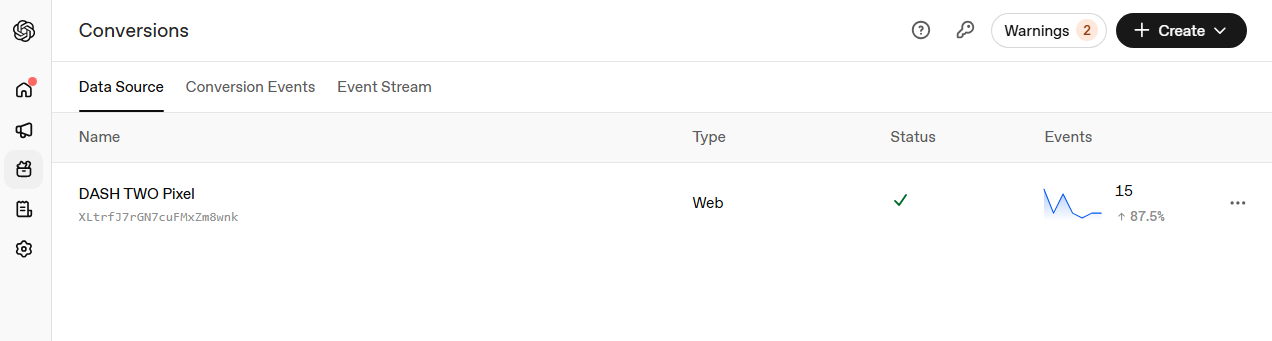
Step 6: Install the conversion pixel
To measure results — and let the system optimize — add the pixel to your site as a data source. Ours, the “DASH TWO Pixel,” started recording web events right away.
Our real results
Here’s what one of our contextual campaigns actually delivered:

- Impressions: 27,714
- Clicks: 272
- Average CPC: $2.76
- CTR: 0.98%
- Conversions: 13
- Cost per conversion: $57.69
For a brand-new, in-beta channel, a sub-$3 CPC and a ~1% CTR on genuinely high-intent conversations is a strong starting point.
Need help setting up an AI campaign? DASH TWO sets up, runs, and optimizes ChatGPT and integrated digital campaigns end to end — so you get results without the learning curve.
Best practices for ChatGPT ads
- Lead with intent, not just brand — write context hints and copy around the problems people bring to ChatGPT.
- Test multiple creatives — we ran distinct angles (general vs. music/entertainment) to see what resonated.
- Always tag your links with UTMs so ChatGPT traffic is measurable in your analytics.
- Install the pixel on day one — optimization and reporting both depend on it.
- Start small, then scale winners — beta pricing rewards early testing, so find your cost-per-conversion and put budget behind it.
What does it cost?
ChatGPT ads run on a CPC (cost-per-click) model. You control spend with your max bid and campaign budget. In our campaigns, clicks came in around $2.76 against a $3.50 max bid, on a $750 campaign budget.
Let DASH TWO run your ChatGPT ads
ChatGPT advertising is a genuinely new frontier, and the brands that learn it now will own it later. DASH TWO is already running live campaigns on the platform — if you’d like us to set up, manage, and optimize ChatGPT ads for your brand, get in touch.